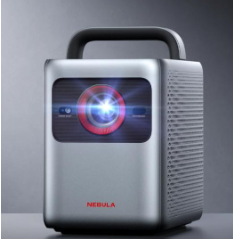
Creating a home theater experience starts with choosing the right projector. Whether you’re a movie buff or a sports enthusiast, the quality of your projector can significantly impact your viewing experience. This guide will walk you through the essential features to consider, help you determine the best type of projector for your needs, and introduce you to some of the top models from Anker. By the end, you’ll have all the information you need to make an informed decision and enjoy a cinematic experience right in your living room.
What Features Should You Look for in a Home Theater Projector?
Resolution and Image Quality
Resolution and image quality are critical factors in your projector selection. Higher resolutions, such as 4K UHD, offer exceptional clarity and detail, making your viewing experience more immersive. Even a 1080p projector can provide excellent quality for most users, ensuring sharp and vivid images. Pay attention to the image processing technology as well, as it can enhance color accuracy and picture depth.
Brightness and Contrast Ratio
Brightness and contrast ratio are equally important. Brightness, measured in ANSI lumens, determines how well the projector performs in various lighting conditions. For home theaters, aim for at least 1500 lumens. The contrast ratio impacts the depth and richness of colors, with higher ratios providing better differentiation between light and dark scenes. Look for projectors with a high contrast ratio to ensure vibrant and dynamic visuals.
How to Determine the Right Projector Type for Your Needs?
LCD vs. DLP Projectors
Choosing between LCD and DLP projectors depends on your specific needs. LCD projectors offer vibrant colors and sharp images, making them ideal for movies and presentations. They are also known for their reliable performance and longevity. DLP projectors, on the other hand, are praised for their smooth motion handling, compact size, and high contrast ratios, which make them suitable for fast-paced content like sports.
Short Throw vs. Long Throw Projectors
The decision between short throw and long throw projectors hinges on your room size and setup flexibility. Short throw projectors can display large images from a short distance, perfect for smaller rooms or limited spaces. Long throw projectors require more distance to produce the same image size but are great for larger rooms or dedicated home theaters. Consider your space and installation preferences when making your choice.
What are Anker’s Top Projector Models?
Capsule Air
The Capsule Air is the world’s smallest pocket projector with Google TV, offering portability and performance in one compact device. It boasts 150 ANSI lumens brightness and 720p resolution, delivering clear and detailed images. The built-in battery supports 2 hours of playtime, perfect for outdoor movie nights or travel. With a quick auto setup feature, you can start watching in seconds. Its rich accessory support and compact design make it versatile and user-friendly.
Cosmos 4K SE
The Cosmos 4K SE provides a stunning cinematic experience with its 4K UHD resolution and Dolby Vision. This projector features innovative hybrid beam technology, offering 1800 ANSI lumens brightness and excellent color accuracy. Anker’s VisionMaster image processing engine ensures natural and delicate colors for a comfortable viewing experience. Additional features include real-time auto focus, auto keystone correction, and a skin-friendly silicone handle for easy portability. Certified Google TV and Netflix compatibility enhance its appeal.
Cosmos Laser 4K
The Cosmos Laser 4K is designed to deliver outstanding brightness and clarity, even in well-lit rooms, with its 2200 ANSI lumens and 4K UHD quality. Its Intelligent Environment Adaptation (IEA) technology enables seamless setup, automatically adjusting the screen to fit perfectly in your space. The ergonomic handle allows for easy movement around the home. Dual 5W tweeters and dual 10W speakers provide immersive sound, enhancing your movie experience. With Android TV 10.0, you’ll have access to over 400,000 movies and episodes on 7,000+ apps.
How to Set Up Your Projector for Optimal Performance?
Placement and Mounting Tips
Setting up your projector correctly is crucial for optimal performance. Start by choosing the right location – ensure the projector is aligned with the center of the screen to avoid image distortion. Ceiling mounts can provide a clutter-free setup and help achieve the perfect height. For short throw projectors, place them on a stable surface close to the screen. Adjustable mounts offer flexibility in positioning, allowing you to fine-tune the image size and angle. Make sure to leave enough space around the projector for proper ventilation.
Calibration and Maintenance Tips
Regular calibration is essential to maintain the best picture quality. Adjust settings like brightness, contrast, and color balance according to your viewing environment. Use calibration tools or built-in projector settings for precise adjustments. Maintenance involves cleaning the lens regularly with a soft, dry cloth to prevent dust buildup, which can affect image clarity. Ensure the projector’s ventilation system is free from obstructions to avoid overheating. Periodically check for firmware updates to keep your projector’s software up-to-date and improve its performance.
Conclusion
Selecting the best projector for your home theater involves careful consideration of various factors, from resolution and brightness to projector type and brand. By understanding these key elements and exploring top models like Anker’s Capsule Air, Cosmos 4K SE, and Cosmos Laser 4K, you can make an informed decision that suits your needs and enhances your viewing experience. Proper setup and maintenance will ensure your projector performs optimally for years to come, providing countless hours of entertainment. With the right projector, your home theater will become a hub of cinematic enjoyment for family and friends.
